How I approach findability for a large portfolio of government websites: where site search is heading, how to test an AI search platform, what a good AI answer shows, and how content shows up in AI assistants.
I led the findability practice in MBIE's Search, AI and Findability team. That work is internal, so this page is about the approach, not MBIE's plans.
Where site search is heading
Most government websites grew their own search, and most still match keywords and return a long list of pages. People don't search like that any more. They type whole questions, in everyday words, and expect an answer.
- Keyword search A long list of pages that contain the words you typed. In the simpler systems, a misspelling or a different word for the same thing can return nothing useful.
- Smarter search Synonyms, spelling, English and te reo Māori, and the most-asked questions tuned by hand.
- Answers A short answer drawn from the site's own pages, with its sources, and the full results underneath.
Each step only works if the content underneath is right. That's why findability is as much about the pages as the search box.
Testing an AI search platform
AI search demos well. These questions get past the demo:
- Answer one of our real questions, from our pages. Not your sample content, ours, typos and all.
- What happens when the answer isn't on our site? A good system says so. A risky one fills the gap.
- Show me where every sentence came from. Each claim should trace back to a page someone can check.
- Does it handle te reo Māori? Macrons, mixed-language questions, and pages in both languages.
- Where is our data stored and processed? And is any of it used to train someone else's model?
- How do we test answers before each release? A fixed set of questions with known answers, run every time.
What a good AI answer shows
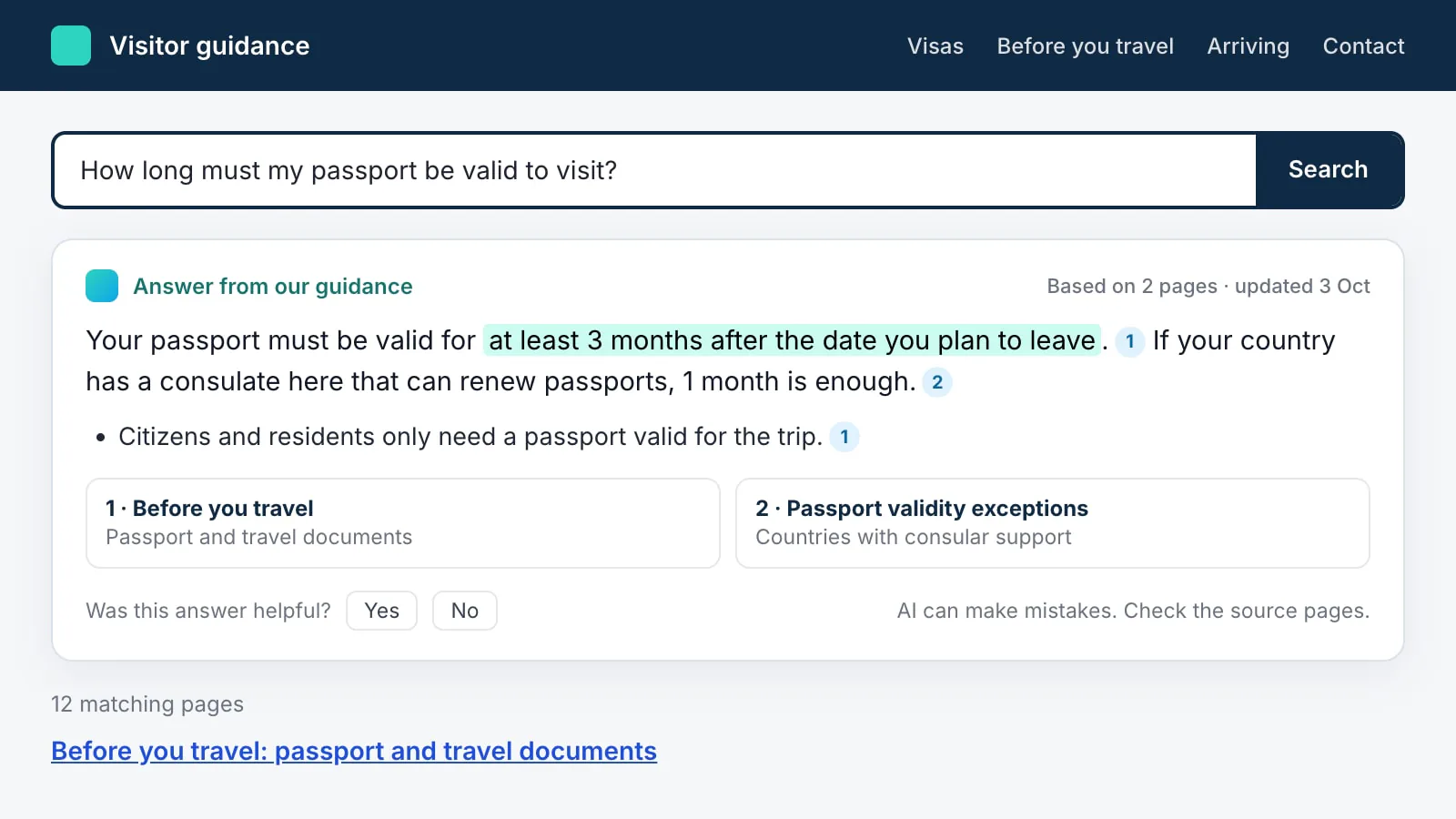
AI-assisted search reads the question, finds the passages that answer it in the site's own pages, and summarises them with links back. On a government site, the answer has to earn trust. It should show:
- Where each part came from, with numbered links to the source pages
- When those pages were last updated
- The ordinary results underneath, for people who'd rather read the page
- A way to say it didn't help, and someone who reads that feedback
Showing up in AI assistants
People also get government guidance from Google's AI Overviews, ChatGPT, Claude, Copilot and Gemini, often without visiting the website. Generative engine optimisation (GEO) starts with checking what those assistants say, then fixing the pages they draw on. Checking AI Overviews for accuracy shows how that check works and why answers go wrong.
Beyond the website
The website is only one of the places people get an answer. I checked the others too:
- Pages AI tools can't read. Some pages and tools only build their content in the browser. A person sees the page; an AI tool sees an empty shell.
- Old documents that outrank new ones. Whether search and AI find the current edition of guidance, or a replaced PDF that's still online.
- The same fact on several sites. Fees, thresholds and rules often appear on more than one site, and when a rule changes, they all need to change.
- Site search in everyday words. The words and typos people really use, compared with what Google finds on the same site.
- Wikipedia and Wikidata. AI tools lean on them, most of all when they can't read the agency's own site.
- Office listings on maps. Often the first answer someone gets on their phone, and not always one the agency looks after.
- Bing as well as Google. ChatGPT and Copilot search through Bing.
- Copycat and paid sites. Who people meet when they search for a free government service.
What I did
- Put together a findability roadmap, with search as one part of it
- Wrote requirements for modern search, including AI-assisted search
- Worked on the approach to GEO, including how accurately AI Overviews represent government guidance
- Findability roadmap
- AI-assisted search
- Requirements
- GEO