Send every old address to the page that genuinely replaces it with a permanent redirect, keep those redirects for years, and check the links you don't control as well as your own. Migrations mostly break findability through links on other sites, in Wikipedia and in emails, and through the copies Google and AI tools already hold.
Why this matters now
Government websites are being merged and moved more than ever. Cabinet has agreed to group agencies into digital clusters that share platforms, with ten clusters planned to be under way by June 2028, led from the new Government Digital Delivery Agency in the Public Service Commission (Cabinet paper). Shared platforms mean migrations, and migrations are when links break.
I saw this at Health New Zealand, where many older health websites were brought into one. The new site was better. The work that kept people finding it was the unglamorous part: mapping old addresses, redirecting them, and watching what broke. More in the info.health.nz project.
Before you move: know what's pointing at you
Most teams list their own pages. Fewer list what links to them. Before the move, make an inventory of:
- every current address, from your sitemap and content management system;
- the pages people actually arrive on, from analytics and Google Search Console;
- links from other sites, especially other agencies, councils and community organisations;
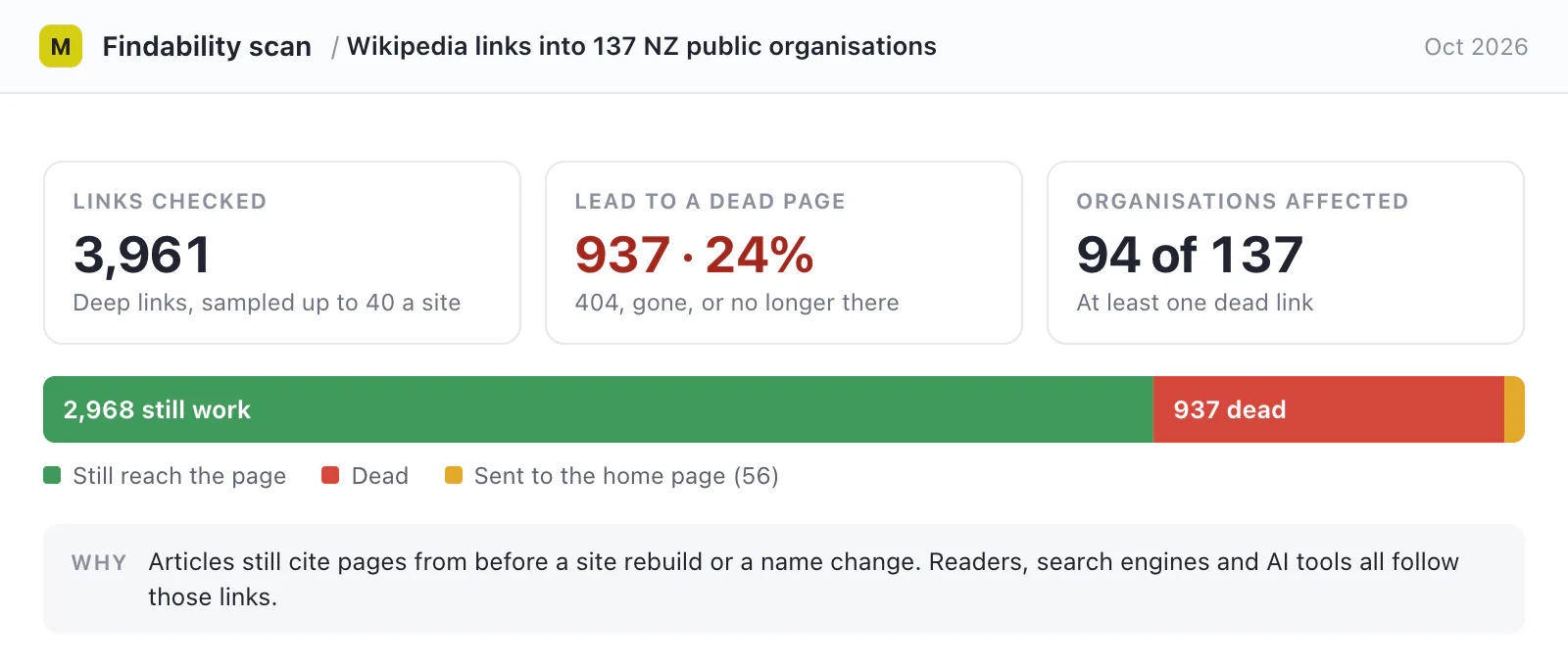
- links from Wikipedia, in English and Māori. Special:LinkSearch lists every Wikipedia page that links to your domain, and people and AI tools both follow them.
Then decide what happens to each page: moved as it is, merged into another page, or retired.
Redirect page to page, not to the home page
Google's guidance for site moves is clear (Google Search Central):
- use permanent, server-side redirects (301 or 308) from each old address to its new one;
- keep them "as long as possible, generally at least 1 year", and for people's sake, indefinitely;
- update your own internal links to the new addresses;
- submit the new sitemap, and keep the old one in Search Console while you monitor the move.
The shortcut to avoid is sending every old address to the new home page. Google says that "might be treated as a soft 404", and for a person it's a dead end with a nicer face: they arrive, can't see what they came for, and phone instead. If several old pages were merged into one, redirect them all to that new page.
Page to page
/services/dog-registration
  → 301 → /animals/dogs/register-your-dog
Someone following an old link from Wikipedia lands on the answer, and Google moves the old page's standing across.
Everything to the home page
/services/dog-registration
  → 301 → /
The person has to search again, or phones. Google may treat it as a soft 404 and drop the page.
A retired page is different. Redirect it only if another page really does the same job, so someone who followed the old link gets what they came for. If nothing replaces it, let the old address return a 404 (not found) or 410 (gone), and make that error page useful: say the content was removed, and link to search and the most likely next steps. A redirect to a page that's merely on a nearby topic is another dead end, and Google may treat it as a soft 404 too.
After you move: check from the outside
A redirect map that's right in a spreadsheet can still fail on the live site. After launch, test from outside:
- request a sample of old addresses, especially the busiest ones, and check each lands on the right page, not an error or the home page;
- follow the Wikipedia links you listed and fix or report the broken ones (Wikipedia has guidance for editing where you have a conflict of interest);
- watch Search Console for spikes in "not found" errors and pages dropping out of the index;
- ask Google and an AI assistant your top questions again, and see which addresses they cite.
Don't forget the AI tools
AI search tools answer from what they have already collected. After a move they can keep citing old addresses, or answer from other sites' copies of your old content, until their crawlers revisit.
Migrations also change servers, firewalls and content delivery networks, and a new default setting can block AI crawlers without anyone choosing to. Check that the search crawlers can still read the new site; see should government websites block AI crawlers?
A short checklist
- List your pages, your busiest landing pages and every link pointing at you, including Wikipedia.
- Map each old address to the new page that replaces it, or mark it as retired.
- Use permanent server-side redirects, and plan to keep them for years. Let retired pages return a helpful 404 or 410.
- Test the busiest old addresses on the live site after launch.
- Check that AI search crawlers can reach the new site.
- Re-check search and AI answers a few weeks later.
If your site has already moved, it isn't too late: broken inbound links can be found and redirected at any time. The findability audit checks Wikipedia and other inbound links for dead pages and home-page redirects, and lists who needs to fix each one. I also work alongside teams on findability, AI search and AI implementation: see AI project consulting.